Google review cards: what the NFC chip really opens
Apple says only an iPhone XS or newer reads an NFC card without an app, and a tap shows a notification. We checked what sellers write to the chip, and how big the QR code must be.
The short answer. A Google review card is a pocket-sized card with a QR code, an NFC chip or both, holding the link that opens your Google review box. Print the QR code on every card: Apple says only an iPhone XS or newer reads an NFC chip without an app. And check whose link the chip holds.
Formgong
Google review cards: what the NFC chip really opens
What a Google review card is
A Google review card is a card the size of a business card that sends a customer to the box where they write a Google review. It carries one link, either printed as a QR code, written to an NFC chip inside the card, or both. You hand it over at the counter, put it in the delivery box, or leave it on the hotel desk, and the customer reviews you without searching for your business on Maps.
The card itself does nothing clever. Everything depends on the link inside it, on whether the customer's phone can read it, and on whether the customer understands what to do in the five seconds they give it. The sections below take those three in order.
NFC or QR: which one works for more customers?
A QR code works on more phones, so print it on every card, NFC or not. Every phone camera reads a QR code. An NFC chip is read without an app only by phones that do background reading, and Apple's Core NFC documentation is precise about which iPhones those are: “iPhone XS and later support background tag reading.” An iPhone 7, 8 or X has NFC hardware but needs an app open to read a tag.
A tap also does not open the review page by itself. Apple's documentation says the system “displays a pop-up notification each time it reads a new tag”, and the customer has to tap that notification. Sellers who write “just tap and the page opens” describe the best case, and so did ChatGPT when we asked it about review cards on 16 November 2026. Tell the customer to tap the phone, then tap the link that appears.
NFC and QR on a review card, checked 16 November 2026 against Apple's Core NFC documentation and Google's help pages
QR code
NFC chip
What the customer does
Opens the camera, points it at the code, taps the link that appears
Holds the top of the phone to the card, then taps the notification that appears
iPhone
Every iPhone with the camera app
iPhone XS and later read it with no app. iPhone 7, 8 and X need an NFC reading app
Android
Every phone with a camera
Phones with NFC switched on in settings
What it holds
The link, printed. You can read it with any QR scanner before you print 500
A link written to the chip, either Google's or the seller's own address
Changing the link later
Reprint the card
Rewrite the chip if it is not locked, or change it at the seller if the chip holds their address
NFC still earns its place. It is quicker than opening a camera, it feels new to customers, and a counter stand with a chip draws taps. The safe card has both: the chip for phones that read it, the QR code for the rest.
What link is on the NFC chip?
The chip holds either Google's review link or the seller's own address, and the difference decides how long your card works. A chip holding Google's link opens the review box for as long as Google keeps that link working. A chip holding the seller's address sends the customer to the seller's server first, which forwards them to Google.
You can tell which one you have from the seller's own words. V1CE's product page says you can “Change the link the same way any time” and that the card then points to your new link. ZappyCards' help centre lists “update redirect link” among the things its app does. A chip that can change destination without being rewritten holds the seller's address. Niagara Stands Out says its cards “are locked to prevent tampering”, and if you move or change your name you contact its support.
Both models are fine if you know which one you bought. The seller's address lets you change the link later and count taps, and it works for as long as the seller runs that server. Google's link written to the chip has no middleman, and it cannot change once the chip is locked. To see what a card holds, read it with a free NFC reading app such as NFC Tools. The URL it shows is exactly what the customer's phone will open.
A dynamic QR code is the same trade. It prints the code maker's short address and forwards from there. A plain QR code that holds Google's review link works without any account anywhere.
Which Google review link to put on the card
Put the link that opens the review box itself, not your Maps listing. Google's help page gives you that link under Read reviews, then Get more reviews, in your Business Profile. It also notes that “reviews QR codes can only be generated on a computer browser”. The second option is search.google.com/local/writereview?placeid= followed by your Place ID, which our Google review link generator builds from a Maps address, with a QR code to download. The link it gives you goes straight to Google, with nothing of ours in between.
When we opened each link format on 31 October, every one ended at Google's sign-in for a customer who was not signed in. That is Google's rule: a review needs a Google account. So say it on the card, as in the wording further down. Our guide to getting your Google review link has the full test, desktop and phone.
Card size and how big the QR code must be
A US business card is 3.5 × 2 inches (88.9 × 50.8 mm), a European one is usually 85 × 55 mm, and NFC cards are mostly PVC in the bank-card size of 85.6 × 54 mm. On any of them, a QR code 25 mm wide, its white margin included, fits next to the text and stays readable from a hand's distance.
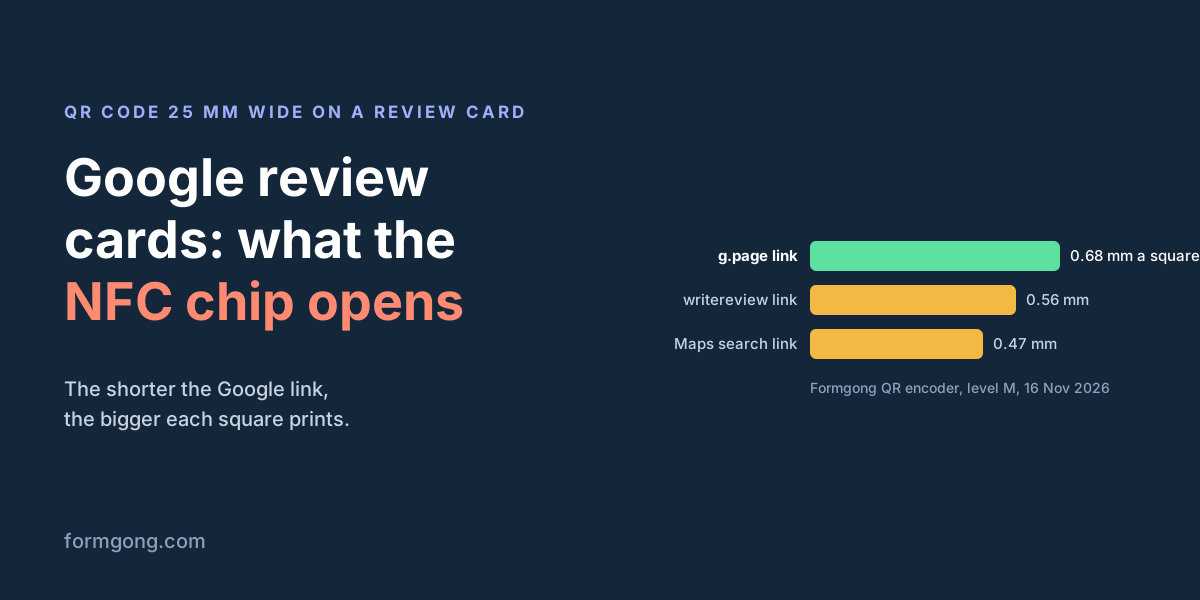
How readable depends on the link. A longer link makes a denser code, so the squares get smaller at the same printed width. We ran three Google review links through the QR encoder behind our generator:
Square size of a 25 mm wide QR code (margin included) for three Google review links, from Formgong's QR encoder (error correction level M), 16 November 2026
Link on the card
Characters
Squares a side, with margin
One square at 25 mm
Google's g.page/r/…/review link from Get more reviews
39
37
0.68 mm
search.google.com/local/writereview?placeid= + Place ID
79
45
0.56 mm
A Google Maps search link with the business name
116
53
0.47 mm
The short g.page link gives the biggest squares, so use it if you have the Business Profile login. A code that holds a Maps search link with your business name packs a third more squares into the same width, and it opens the map rather than the review box. Our article on the review QR code covers sizes for counters, tables and doors, and a test of how much of the code you can cover with a logo.
How to make a Google review card for free
You need the review link, a QR code saved as SVG, and a card layout. The SVG keeps the code sharp at any print size.
Copy the link from Get more reviews, or paste your Maps address into the generator.
Download the QR code as SVG and place it on a card layout 88.9 × 50.8 mm (or 85 × 55 mm), at least 25 mm wide with its white margin.
Print a few on matte stock first. Gloss reflects light into the camera.
Scan the printed card with an iPhone and an Android phone, from where the customer will hold it, and check that it opens the review box.
For an NFC card, write the same link to the chip with an NFC writing app as a URL record, tap it with both phones, and lock the chip only after that test.
Each location needs its own card, because each Business Profile has its own review link. A card for the wrong branch puts the review on the wrong page.
What to write on a review card
One question, one action and how long it takes is all a card needs. People decide in seconds whether to bother.
Front: your logo and a single line such as “How did we do? Tell us on Google.” Back: “Scan the code, or tap your phone here and tap the link. You'll need a Google account. It takes a minute.” Add your business name as it appears on Maps, so the customer knows they landed in the right place.
Hand the card over with a sentence rather than leaving it on the counter. A card that comes with “we read every review” reads as an invitation.
Where to hand out review cards
Hand the card over at the moment the customer is happiest with what you did, which differs by business.
Café or restaurant: in the folder with the bill, or on a counter stand with the chip by the till.
Shop: at the till with the receipt.
Online shop: in the delivery box, on top of the product.
Salon or clinic: at checkout, after the customer has seen the result in the mirror.
Tradesperson or cleaner: left on the kitchen table at the end of the job, with a sentence about it.
Hotel: on the desk in the room, and again at checkout.
Customers who never visit you get the same link by email or message instead of a card. Our review link generator gives you the link for that too.
Google's rules for review cards
A review card is allowed as long as every customer gets the same card with no reward attached. Google's Maps content policy forbids offering incentives “in exchange for posting any review”, says businesses may not “selectively solicit positive reviews from customers”, and may not “Discourage or prohibit negative reviews”. Reviews based on a conflict of interest, such as current or former employment, are not allowed either.
In practice that means no discount for a review, no card only for the customers who looked happy, and staff do not review their own workplace. Give the card to everyone, and answer the reviews that come in, the bad ones first.
Collect reviews on your own site as well
Google reviews help people who find you on Maps, and reviews on your own site help the people already on it. Formgong Reviews gives your site a review page with its own link and QR code, so the same card can carry a second code for it. Each location you add gets its own link and code, 10 locations on the Free plan, and the dashboard compares them by number of reviews, average rating and how often you replied.
A widget with no view limit. The review widget, carousel, badge and stars in product lists load as often as your pages do.
Review emails in your store's name. Sent after each order with your logo and colours, replies to you, no email service to set up; buyers can rate inside Gmail without leaving the email, and get one reminder (how it works).
Bring your old reviews.Import from Judge.me, Yotpo, Loox, Shopify Product Reviews, WooCommerce, Etsy or a CSV.
You decide what shows. Approve each review or choose a publishing mode, reply in public or in private, and let shoppers ask the author a question.
Google. A Merchant Center review feed, and product rating markup through the WordPress plugin.
Reviews from your form. People who filled in your contact form can get a review request automatically.
One account for the rest. Contact forms with Telegram and Google Sheets, an AI help chat, and free website templates.
Frequently asked questions
What is a Google review card?
A card with a QR code, an NFC chip or both that holds the link to your Google review box. The customer scans or taps it and writes the review without searching for your business on Maps.
Do Google review cards work on iPhone?
The QR code works on every iPhone with a camera. The NFC chip is read without an app only on an iPhone XS or newer, and a tap shows a notification the customer has to tap. iPhone 7, 8 and X need an NFC reading app.
How do I make a Google review card for free?
Copy the link from Get more reviews in your Business Profile, or build it in a review link generator. Download the QR code as SVG, place it at least 25 mm wide on an 88.9 × 50.8 mm layout, print on matte stock and test it with two phones.
Does an NFC review card need a subscription?
It depends on the link written to the chip. A chip holding Google's review link needs nothing. A chip holding the seller's address works only while the seller's server forwards it. Read the card with an NFC reading app to see which one you have.
Can I give review cards only to happy customers?
No. Google's Maps content policy forbids selectively asking for positive reviews and offering any reward for a review. Give the same card to every customer.
Sources and documentation
Official references for this guide: Apple Developer: Adding support for background tag reading (Core NFC), Google Business Profile Help: Create a Google link or QR code to request reviews, Google Maps: User contributed content policy, V1CE: NFC review cards, Niagara Stands Out: NFC Google reviews FAQ. Google review link generator, where data is stored.