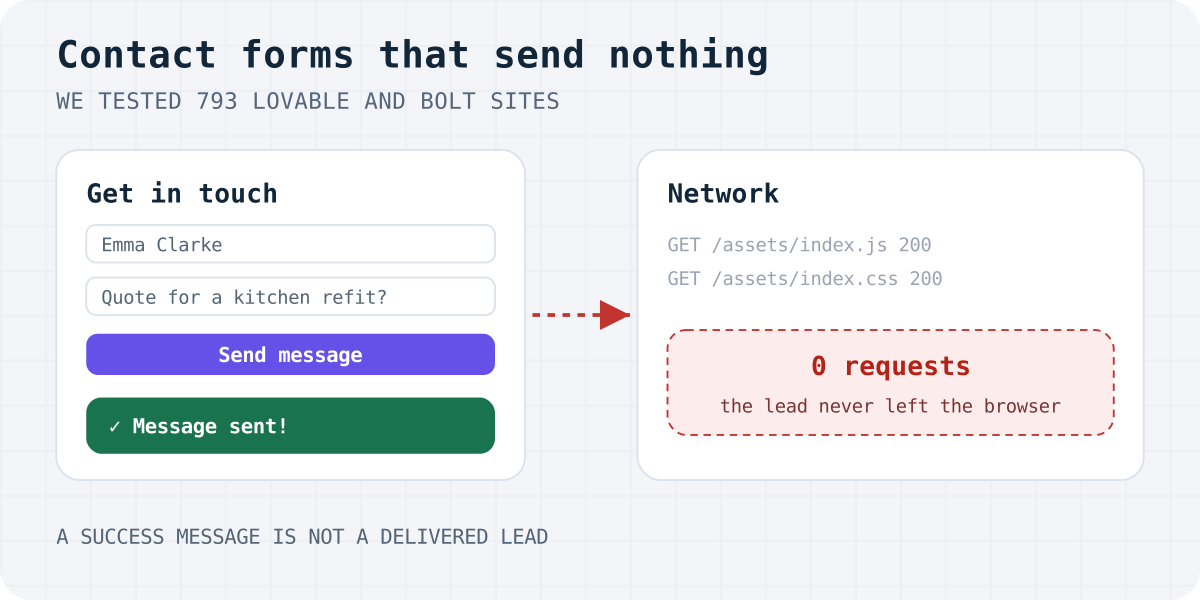
What a fake contact form looks like
From the visitor's side it looks perfect. The fields validate, the button says “Sending…”, and a green toast thanks them. Behind it, nothing leaves the browser: no request, no email, no saved row. The visitor thinks they reached you. You never hear about it.
When we read the code behind these forms, the pattern was nearly always the same: the submit handler waits a second, shows a toast and clears the fields. There is no fetch, no email service and no database call.
// What we found, again and again (de-minified, names shortened):
onSubmit={(e) => {
  e.preventDefault();
  setSending(true);
  setTimeout(() => {
    toast({ title: "Message sent!", description: "We'll get back to you soon." });
    form.reset();
    setSending(false);
  }, 1000);
}}
The results
We found a contact form on 119 of the 793 sites we tested; most of the others were apps, dashboards and tools with no contact form at all. For 105 of those forms the test gave a clear answer (the other 14 could not be loaded or clicked on the final run, or rejected our test values). This is what happened when we pressed send:
- 27 of 105 showed a success message and sent nothing. We read the submit code of 21 of them and confirmed there is no network call; for the rest the code was minified beyond reliable reading, but the browser saw no request.
- 12 of 105 did nothing a visitor could see: no request, no message. Some may fail validation silently; either way, no message is sent.
- 7 of 105 opened the visitor's email app with a
mailto:link. That works only if the visitor has a desktop mail client set up. - By builder: 12 of 67 Lovable forms and 15 of 38 Bolt forms were fake.
The forms that did send went to: a Supabase database table (14), a Supabase edge function (13), EmailJS (13), the site's own server (4), Formspree (3), FormSubmit (1), Google Apps Script (1), other services (5).
Aren't these just demos?
Some are. Our sample leans towards developers: hackathon entries, portfolios and side projects. A fake form on a hackathon demo costs nobody anything. So before counting, we fixed a rule and sorted every site into one group: demo (hackathon entry, or placeholder contacts such as a 555 phone number or an example.com address), portfolio (a personal site), or no demo signs (everything else).
Demos fake their forms most often, as you would expect. But the problem does not go away on the rest: 16 of 73 sites with no demo signs — shops, studios, a cleaning company, product sites; 5 of the 30 on their own domains — had a form that thanks the visitor and sends nothing. “No demo signs” is a cautious label, not proof that a business depends on the form.
How we tested
- Sample. 813 live sites built with Lovable or Bolt, collected from madewithlovable.com, GitHub projects that use Lovable's or Bolt's build files, Hacker News and the Bolt hackathon gallery. 20 were used only to debug the test.
- Find the form. A real Chrome (Playwright) opened the homepage, then
/contact. A contact form needed a message box and a name, email or phone field; login and newsletter forms did not count. - Submit without sending. We filled every visible field with clearly fake test values, never touched honeypot fields, and pressed send. From that moment every outgoing request was recorded and aborted, so nothing reached the owner or any service. Analytics pings were ignored.
- Classify. A form “sends” only if a request carried what we typed. It “fakes success” only if no such request was made and a success message appeared (watched every 250 ms for five seconds, including
alert()boxes).
We wrote the rules down before testing and logged every change. The first runs had faults: analytics pings counted as sending, short-lived toasts were missed, and filling a hidden honeypot triggered fake “thank you” messages meant for bots. Each fault was fixed, checked against 23 test pages with known answers, and every form site was tested again. We then read the submit code of the fake forms by hand. The full story of the method and its twelve bugs is in How we tested AI-built contact forms, and the harness is open source on GitHub.
Check your own form in 30 seconds
A green message proves nothing. A request proves the form tried, and only your inbox proves it delivered. The steps are below; the Payload tab of the request should contain the text you typed.
Why AI builders produce fake forms
What we can show is the code. In the fake forms we read, nothing had broken: the submit handler was a placeholder that waits, shows a toast and clears the fields, and it never sent anything at any point.
Why the placeholder is there is our reading, not a measurement; we did not test what Lovable or Bolt generate by default. A contact form is two things: the fields on the page and something on a server that receives the message and tells you about it. The first part needs nothing but code. The second needs an account, a key or a backend decision, and Lovable's own documentation points you to Supabase plus an email service such as Resend, connected through an edge function. If nobody makes that decision, a form that only looks finished is the easy result.
How to fix a form that sends nothing
You have three reasonable options:
- Build the backend in your project. In Lovable: a Supabase table, an edge function and an email provider. Our guide Lovable form not sending email? 6 fixes covers the usual failures.
- Use
mailto:. No setup, but it only works for visitors with a desktop mail app, and you get no copy of the message. See mailto vs a form backend. - Point the form at a form backend. The form posts to one URL; the service stores the message and emails it to you. Formgong, Formspree and Web3Forms all work this way. With Formgong the free plan includes 300 submissions a month, Telegram alerts at once and EU data storage; there is a ready Lovable project to remix. For coding agents (Claude Code, Cursor, Codex) there is a skill that adds the form and replaces fake handlers:
npx skills add formgong/skills.
Whatever you choose, show the success message only after the server confirms. Paste this into Lovable or Bolt to replace a fake handler:
My contact form shows a success message but does not send anything.
Make it send for real:
1. On submit, POST the form fields to https://formgong.com/submit with fetch and FormData,
   header Accept: application/json, and append access_key = "fk_your_access_key".
2. Show the success message only if the JSON response has success === true.
   Otherwise keep what the visitor typed and show the returned message.
3. Keep a hidden honeypot input named "botcheck" inside the form.
Do not add Supabase, edge functions, Resend or EmailJS. Do not change the design.
Limitations
- The sample is not random. It comes from public listings and leans towards developer projects; galleries favour polished sites.
- Because we blocked every request, we saw whether a form tried to send, not whether the email arrived. Forms counted as “sends” can still fail later.
- Each site was tested several times while we fixed the test; the numbers come from the final pass on 8 October 2026. A few sites changed class between passes because they loaded slowly or failed to load. Sites change; a form that was fake may have been fixed since.
- A
mailto:opened without any message on screen, or a form blocked by its own validation, can look like “nothing happens”. That is why we report that group separately and never add it to the fake count. - We do not name sites. The point is the pattern, not the people who published a demo.
Frequently asked questions
How do I know if my contact form actually sends?
Open your live site, press F12, go to the Network tab, submit the form once and look for a new request that contains what you typed. If no request appears, the form sends nothing, whatever message it shows. Then confirm the message reached your inbox or dashboard.
Why does my Lovable or Bolt form say “Message sent” but I get no email?
Often the submit handler only shows a toast and never sends a request. If a request is sent, the problem is further along: the email service key, an edge function error, or spam filtering. The Network tab tells you which case you have.
How many AI-built contact forms send nothing?
In our test of Lovable and Bolt sites in October 2026, 27 of 105 contact forms showed a success message without sending anything, and 12 more did nothing visible. On sites without demo signs, 16 of 73 were fake.
Did you send messages to these sites?
No. Every request after the click was blocked in the browser, so no message reached a site owner or any form service.
What is the quickest way to make the form work?
Point the form at a hosted form backend and show success only after it confirms. A prompt for Lovable or Bolt is in this article.
Sources and documentation
Official references for this guide: Lovable documentation: Resend integration, Chrome DevTools: Inspect network activity, MDN: Using the Fetch API, Playwright: Network interception. Formgong for Lovable, where data is stored.