What is lead follow-up?
Lead follow-up is every message you send after your first reply to an inquiry, until the person says yes, says no, or you decide to stop. It starts where speed to lead ends: the first answer went out, and nothing came back.
Silence rarely means no. The person who asked about a bathroom on Sunday evening has a job, children, and two other quotes in their inbox. Your reply arrived on Monday at 11:00, between a meeting and lunch, and got lost. A follow-up is how you get back to the top of that inbox without being a nuisance.
It is also different from a newsletter. A follow-up is a personal message about the thing they asked for. Adding them to your mailing list is a separate decision, and you should ask them first.
How many times should you follow up with a lead?
Five or six times, spread over about two weeks, is what the best data we found supports, and most businesses stop long before that.
Velocify, a company that sells sales software, had already found in earlier research that half of all leads were called only once. Its larger study, of almost 3.5 million leads, found that 93% of the leads that eventually bought had been reached by the sixth call, as the Rainmaker Institute reported in March 2016. Leads that took more than seven calls to reach were 45% less likely to convert, so there's a point where more attempts stop paying.
In a May 2016 release, Velocify said that up to six follow-up calls at set intervals raised both contact and conversion, and that the time of day mattered much less than people think: the best and the worst hour to call differed by 2.6%. What did matter was not waiting: leaving a lead nearly 24 hours before calling back cut the chances sharply.
These are sales calls from companies with sales teams, measured by a vendor, so take the exact percentages loosely. The shape is what's useful for a small business: one attempt is far too few, five or six is about right, and after that you're mostly annoying people.
Where does “80% of sales need five follow-ups” come from?
Not from any study we could find. It's the most quoted number on this topic, and we traced it back as far as it goes.
The earliest version we found is a 2009 column on the UK site Marketing Donut by Robert Clay, the founder of Marketing Wizdom. It says that 80% of non-routine sales happen only after at least five follow-ups, and gives its source only as different studies by different market research companies, none named. The same column has the other famous figures: 44% of salespeople give up after one “no”, 22% after two, 14% after three, 12% after four. No source is given for those either. Later copies dropped the word “non-routine” and applied the 80% to everything.
There's a second version: 2% of sales on the first contact, 3% on the second, 5% on the third, 10% on the fourth and 80% on the fifth to twelfth. Most pages credit it to the National Sales Executives Association. That association is now Sales & Marketing Executives International, and it looked in its own archives. It found a 1942 survey by its Long Island chapter, asking members how many calls they made per sale. Fewer than 40 people answered.
The advice behind both numbers, keep going after the first silence, is sound and matches the Velocify data. The numbers themselves aren't evidence of anything, so we don't use them.
Do people write again when they don't hear back?
Some do, and those are the people who still want the job done. We looked at everyone who left an email in a Formgong user's form in the month to 23 November 2026: 325 people writing to 26 small businesses, with spam and the owners' own test messages taken out.
| What the person did | All 26 businesses | Without the largest one |
|---|---|---|
| Wrote to the same business again | 38 of 325 | 16 of 115 |
| …an hour or more after the first message | 15 of 325 | 6 of 115 |
| …a day or more after the first message | 9 of 325 | 6 of 115 |
Most second messages came within an hour: a forgotten detail, a photo, or the form sent twice. The interesting ones are the 15 people who came back an hour or more later, and the 9 who came back after a day or more, one of them ten days later. We can't see what happened in between, because owners mostly reply from their own email, not from the dashboard. But someone who returns to your contact form a week later is still interested, and the next step was theirs, not yours. A follow-up from you on day 2 would have got there first.
Leave out the business with the most messages and the share goes up: 16 of the other 115 people wrote again, 6 of them a day or more later.
When should you send each follow-up?
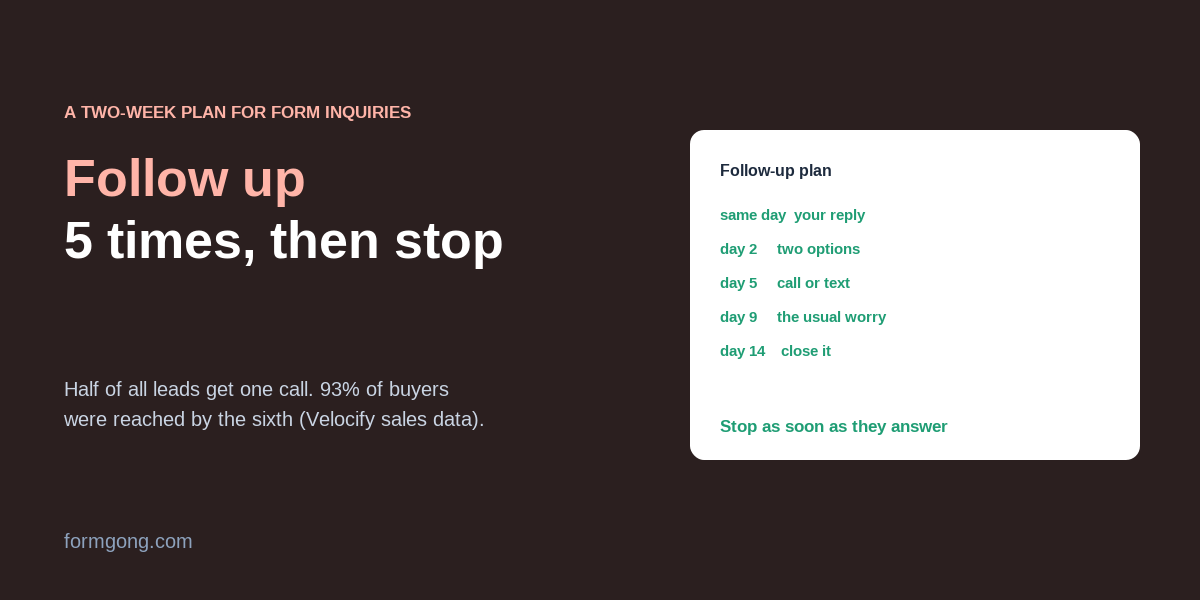
Send the first follow-up two days after your reply, then space them out, and stop after two weeks. That's five messages from you; the automatic reply doesn't count, it's only a receipt. This is the plan we'd use for an inquiry that came through a website form:
| When | Message | What it does |
|---|---|---|
| Minutes after the form | Automatic reply | Says the message arrived and when you'll answer |
| Same day | Your first real reply | Within the hour in working hours; answers the question and asks one thing back |
| Day 2 | Follow-up 1 | Short, and offers two concrete times or options |
| Day 5 | Follow-up 2 | Another channel: a call or a text if they left a phone |
| Day 9 | Follow-up 3 | Answers the worry that usually stalls this kind of job |
| Day 14 | Last message | Closes the request politely and leaves the door open |
Three rules make it work. Stop the moment they answer, even if the answer is no, and at once if they ask you to stop. Change something each time, whether that's the channel, the offer or the question, because sending the same email again only tells them you have a template. And if they say “later”, write down the month they named and contact them then, once, instead of on day 2.
The days don't have to be exact. Velocify found the hour you call matters little, and in our own data most messages arrive outside working hours anyway, so send follow-ups when you have five quiet minutes, not at a “best time”.
What should a follow-up message say?
One thing per message, in a few lines, about their job rather than your business. Here are the five messages from the plan, for a tiling company answering Maria, who sent bathroom photos through the website form. Swap in your trade and your details.
Your first reply, the same day. It answers what she asked and asks one easy question, so replying takes her ten seconds.
Hi Maria,

Thanks for the photos of the bathroom. Yes, we can do the floor and the
shower wall. For a room that size it's usually two days.

To give you a price I need one thing: do you already have the tiles,
or would you like us to supply them?

Dan, Coastline Tiling
Day 2. Short, no guilt, and two concrete options. A choice is easier to answer than “let me know”.
Hi Maria,

Just checking this reached you. I could come and measure on Thursday
at 17:30 or Saturday morning, whichever suits you.

Dan
Day 5, another channel. If she left a phone number, call once, and if she doesn't pick up, send this as a text. People who ignore email often answer a text, and the other way round.
Hi Maria, it's Dan from Coastline Tiling about your bathroom.
I tried you by email too. Happy to measure this week if you're still
looking, just reply with a day.
Day 9. Answer the worry that usually stops this kind of job: the mess, the price, the timing. You know which one it is for your trade.
Hi Maria,

People often wait on a tiling job because they're not sure about the
mess. We cover the hallway, take the old tiles away the same day,
and the shower is usable again 24 hours after we finish.

If timing is the issue, I can also hold a slot in January for you.

Dan
Day 14, the last one. It says you'll stop, which takes the pressure off. This is often the message people answer, because there's no longer anything to avoid.
Hi Maria,

I haven't heard back, so I'll close this for now and stop writing.
If the bathroom comes back up, just reply to this email and we'll
pick it up from here.

Dan, Coastline Tiling
What to leave out: “just checking in” on its own, “as per my last email”, and a new discount in every message. If you offer a discount, offer it once.
When should you stop following up?
After the last message on day 14, or as soon as they say no, whichever comes first. A clear no is an answer, not an objection to overcome: thank them and close it.
After that, a lead who went quiet can get one more message only if something changes for them: they told you about a date, or you have a free slot in the month they wanted. That's not chasing, it's keeping a promise. Everything beyond that, like monthly offers, belongs in a newsletter they agreed to.
Keep a simple list of open inquiries with the date of the next follow-up next to each. A spreadsheet works. What doesn't work is relying on memory: the inquiry from the busy week is always the one that slips.
How does Formgong help you follow up?
Formgong keeps every inquiry in front of you until you've dealt with it. Each message reaches your email and, if you like, Telegram, with Reply and Mark handled buttons. If a real visitor's message is still marked new 15 minutes after it arrived, you get one email with the message and a drafted reply you can send as it is. And once a day, Telegram can remind you about messages still marked new after 24, 48 or 72 hours. All of that is on every plan, including Free.
On the paid plans, Formgong also writes to the visitor for you. The automatic reply goes out the moment they press Send, in your business's name. The visitor reminder sends one more email a set number of hours or days later, to people who ticked the box on your form asking for it. Mark the message handled and the reminder is cancelled, so nobody gets a reminder about a job you've already booked.
On Pro, Customers puts everyone who left an email or a phone in one list, with every message they sent through any of your forms and your own notes. Set a follow-up day on a person, with a line on what to do, and Formgong emails you that morning. People you're late with are marked Overdue. That's the list from the section above, without the spreadsheet. Pro comes with a 14-day free trial, no card needed. If your inquiries are quotes, our quote request form guide shows what to ask so your first reply can include a price.
How do you follow up?
We'd like to hear how you do it. How many times do you write before you let an inquiry go, and has a late follow-up ever won you a job? Write to support@formgong.com. If you tell us what you sell, we'll suggest what to say on day 9 for your trade.
What Formgong's free plan includes
- Build the form or bring your own. The form builder takes the colours and fonts from your site's address, with no sign-up; ready form templates copy into your account; AI writes the fields from one sentence. Any hand-written HTML form works too.
- Websites with the form already connected. 28 free website templates post to Formgong out of the box.
- 250 submissions a month on unlimited forms. Spam does not count. Once a year, a busy month keeps delivering on credit until the 7th instead of stopping.
- Everywhere you work. Email to up to 3 people at once, Telegram with Reply and Handled buttons, Google Sheets, Notion, and 3 signed webhooks for Slack, Discord, Zapier, Make or n8n.
- Emails to your customers in your business's name. Formgong sends them under your business name and replies come back to you, with no email service of your own to set up: a review request to every lead, and review emails after an order with your logo and colours. People who agree can also go straight into your Mailchimp, Klaviyo, Brevo, MailerLite or Kit list. An automatic reply to each visitor and a reminder a visitor asked for are on the paid plans.
- No captcha needed. A server-side spam filter, a honeypot, allowed domains and a block list; add your own Turnstile key if you want one.
- Files, voice and signatures. Visitors can attach files, record a voice message that arrives transcribed, or sign a waiver or release on their phone.
- Made for AI-built sites. A hosted form page and a contact button; step-by-step guides for sites built with Lovable, Bolt, v0, Replit and Base44; an MCP server lets Cursor or Claude wire the form for you.
- See what the form does. Analytics for views, starts, conversion and where each lead came from, and an alert when a form goes quiet.
- One account for the rest. Customer reviews and an AI help chat that answers visitors from your own pages, with every message in one inbox. Data is stored in the EU.
Frequently asked questions
How many times should you follow up with a lead?
Five or six times over about two weeks, then stop. In Velocify's sales data, 93% of buyers were reached by the sixth call, and half of all leads got only one. Past seven attempts, results dropped.
How long should I wait between follow-ups?
Reply the same day, then wait two days for the first follow-up and a few more each time after: day 2, day 5, day 9, day 14. The wait that hurts most is the first one: Velocify found that calling back nearly a day later cut the chances sharply.
How do I follow up without being pushy?
Keep each message short, make it about their job, and give them something easy to answer, like two times to choose from. Saying in the last message that you'll stop writing is polite, and people often reply to it.
Is it true that 80% of sales need five follow-ups?
There's no study behind it that we could find. It goes back to a 2009 column that cites unnamed studies, and a similar ladder to a 1942 survey of fewer than 40 salespeople. Keep following up anyway, just not because of that number.
Sources and documentation
Official references for this guide: Formgong: Speed to lead, Formgong: Manage leads in Telegram. Submissions not arriving, where data is stored.