What is customer follow-up?
Customer follow-up is every message you send to someone after they've paid you: the thank-you, the check that everything works, the request for a review, and the note when it's time to come back. It begins where lead follow-up ends. That one is about getting a yes; this one is about the next job, and the one after that.
For a small service business, those next jobs come from two places: the same customer again, and the people that customer tells. Both depend on the customer still remembering your name when the need comes up, which may be a year later. A few short, useful messages in the first weeks are what make that happen.
It isn't marketing. A follow-up is a personal message about the job you did for them. Offers and news belong in a newsletter they signed up for, and you should ask before adding anyone to one.
What should you send after the job, and when?
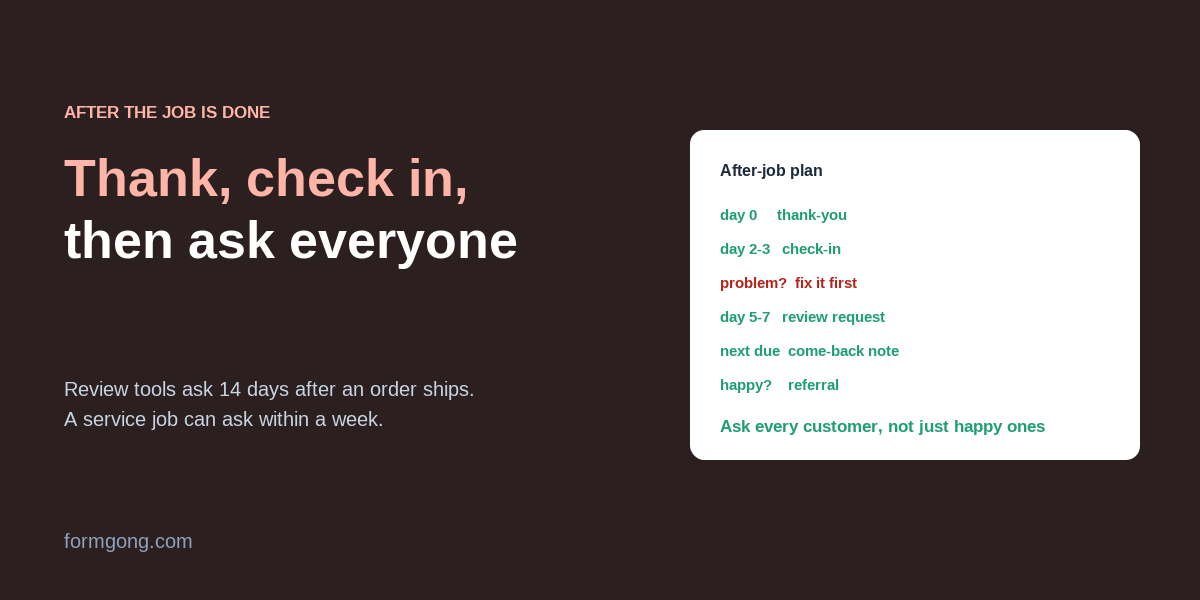
Six messages at most, each sent once, and most customers will only need four of them. The clock starts when the job is done, not when the invoice is paid: that's the moment the customer starts living with your work.
| When | Message | What it does |
|---|---|---|
| The day the job is done | Thank-you | Thanks them, says what you did, and how to reach you |
| 2–3 days later | Check-in | One question: is everything as it should be? |
| If something is wrong | Fix-it reply | Same day; a date to come back, no arguing |
| 5–7 days after the job | Review request | Sent to every customer, with a direct link |
| When the next visit is due | Come-back note | Only if they agreed to hear from you, with an easy way to say stop |
| After they said they're happy | Referral ask | Once, and easy to forward |
The order matters more than the exact days. The check-in comes before the review request, so that any problem reaches you first and you have time to fix it. The review request then goes to every customer whose job is finished, including the one whose tile you came back to replace. Asking only the customers who said they were happy is the one thing the big review platforms all forbid, as the rules below show.
Channel: use whatever the customer used to reach you. Someone who filled in your website form will read email; someone who texted you will read a text. Keep the same thread, so they see the whole job in one place.
What should each follow-up message say?
One purpose per message, a few lines, and the details of their job, not your company. Here are all six for Dan, who tiled Maria's bathroom after she sent photos through his website form. Swap in your trade and your details.
The thank-you, the day the job is done. It says what you did and where the leftovers are, which is useful in a year when a tile cracks, and it gives a direct way to reach you.
Hi Maria,

Thanks for having us. The bathroom is finished: floor and shower
wall, with the grey grout you picked. I left the care sheet and
the spare tiles in the cupboard under the sink.

If anything looks wrong, reply to this email or call me on
(312) 555-0142.

Dan, Coastline Tiling
The check-in, two or three days later. One concrete question about the thing they'd notice. “How is everything?” gets “fine”; a specific question gets a real answer.
Hi Maria,

Quick one: how's the shower after a few days of use? Any grout
lines or edges that don't look right?

Dan
The fix-it reply, if the check-in finds a problem. Thank them, say sorry once, and offer a date. Don't explain why it isn't your fault, even when it isn't.
Hi Maria,

Thanks for telling me, and sorry about that. A cracked tile by the
drain shouldn't happen. I can come on Thursday at 8:00 to replace it,
at no cost. Does that work?

Dan
The review request, five to seven days after the job. A direct link, one sentence on why it helps, and “good or bad” in plain words, because you're asking everyone. Our review request templates have more versions, including ones for shops.
Hi Maria,

Thanks again for choosing us for the bathroom. If you have a minute,
would you write a few words about the job? Other people choosing a
tiler read these. Good or bad, I'd like to hear it.

[link to your review page]

Dan, Coastline Tiling
The come-back note, when the next visit is due. It's about their bathroom, not your offer, and it gives a real reason to call now. Send it only if they agreed to hear from you again, and make it easy to say stop; the thank-you is a good place to ask.
Hi Maria,

It's been a year since we tiled your bathroom. That's when I
suggest checking the silicone around the shower tray, because it
is the first thing to go. I can look at it in 15 minutes if I'm
in your area. Want me to book you in?

Dan
The referral ask, once they've said they're happy. This is the one message that does depend on how the job went. It asks nothing in return and is easy to forward.
Hi Maria,

Glad you're happy with it. If a friend or neighbour ever needs a
tiler, feel free to pass on my details. This link has my number
and photos of recent jobs: [link]

Dan
Leave out: “just checking in” with no question, a discount in every message, and any request for “five stars”.
What if the check-in brings a complaint?
Answer it the same day and offer to fix it before anything else. A customer who tells you about a problem privately is giving you the chance to put it right before they tell anyone else.
Fix it, then carry on with the plan as usual: the review request still goes out, a few days after the fix. Many owners skip it here, out of fear. But a customer whose problem was fixed quickly can write a very convincing review, because it shows the next customer what happens when something goes wrong. And skipping them only because they complained is exactly the selective asking the platforms forbid. If the review is critical anyway, a calm public reply does more for the next customer than a page of only five-star reviews.
When should you ask for a review after a sale?
After the customer has had time to use what they paid for, and while they still remember it. For a service job, five to seven days after you finish is a good default: after the check-in, while the job is fresh. For goods sent by post, count from delivery: review tools wait two weeks by default.
| Tool | Default | Counted from |
|---|---|---|
| Yotpo | 14 days | after the order is processed |
| Loox | 14 days | after fulfillment |
| Stamped | 14 days | after fulfillment |
| Amazon “Request a Review” | 5 to 30 days, once per order | after delivery |
| Etsy | a 100-day window to review | from the estimated delivery date |
| eBay | a 60-day window for feedback | from delivery |
The 14 days of Yotpo, Loox and Stamped are counted from when the order is processed or fulfilled, so they include the days the parcel spends in the post. That's why a service business, where the customer sees the result the day you leave, can ask sooner. The marketplaces show the other end: Amazon won't let a seller ask before day 5 or after day 30, and Etsy and eBay close the review window after 100 and 60 days. Our guide on when to send a review request email goes through the timing for shops in detail.
Send one request, and at most one reminder a week later. A third message about the same review starts to feel like pressure.
Can you ask only happy customers for a review?
No. Google and Trustpilot forbid it in their own policies, and Yelp goes further and asks you not to request reviews at all. This is the step where most follow-up advice goes wrong: many guides, and even some AI answers, suggest checking who's happy first and asking only them for a review.
| Who | What it says |
|---|---|
| Google (Maps and Business Profile reviews) | No discouraging negative reviews, no “selectively” asking for positive ones, no discounts, payment or free goods for a review. |
| Yelp | Don't ask anyone for a review, and don't ask after collecting feedback “in other places like surveys or contact forms”. |
| Trustpilot | Businesses must not “cherry pick” who they invite. |
| FTC rule (United States) | Bans showing your reviews as if they were all of them while holding back the negative ones, and rewards that depend on what the review says. On asking only happy customers, the rule itself is silent, but the FTC says the practice “could violate the FTC Act”. |
Yelp's line about contact forms is aimed at the very trick those guides suggest: collect feedback first, then send the happy people to Yelp. If Yelp matters in your trade, let your reviews there arrive on their own and put your request link on Google or your own review page instead.
What all of them allow is the plan above: one honest request to every customer, with no reward that depends on what they write. Rewards in general are their own subject; we wrote up when a discount for a review is allowed, and what the FTC rule on fake reviews bans for shops.
Do follow-up statistics hold up?
Mostly not the ones you'll see quoted. Some pages on this topic say that 44% of salespeople give up after one follow-up, or that 60% of customers say no four times before saying yes, without naming a study. We traced the 44% back to a 2009 column that gives no source either; we cover where it comes from in our lead follow-up guide. We found no study behind the 60%.
Those numbers are about chasing new prospects anyway, not about customers who already paid. That's why the plan on this page has no percentages in it. The default timings above are things you can check yourself, on each tool's own help page.
How does Formgong help you follow up with customers?
Formgong keeps the whole job in one place, from the first message to the review. Every message from your website form arrives in your email and dashboard, and when the job is done you can press Ask for a review on it. The customer gets one email with their first name and the request they sent you, so they know which job you mean, and a link to your own public review page. No reminders follow.
If you'd rather not remember, switch on Ask customers for a review for a form. Every customer who left an email then gets that one email 3, 7 or 14 days after their message, never more than once in 90 days per address. The days count from the message, not the finished job, so pick the one that fits your work: 7 if you usually do the job within a few days of the inquiry, 14 if it comes a week or more later. It asks everyone the same way, which is what Google and Trustpilot require, and the reviews arrive on your review page under the same publishing setting as all the others. Both are on every plan, including Free.
On the paid plans, the visitor reminder can send one more email a set time after the message, up to four weeks later, to customers who ticked a box on your form asking for it. And on Pro, Customers lists everyone who wrote to you, with every message and your own notes. Set a follow-up day on a person, such as the date the next service is due, and Formgong emails you that morning. That's the come-back note without a calendar. Pro has a 14-day free trial, no card needed. To show the reviews you collect on your site, see adding reviews to your website.
How do you follow up with your customers?
We'd like to hear how you do it. Do you send a thank-you after each job, and when do you ask for a review? Has a check-in ever saved you a bad review? Write to support@formgong.com. If you tell us your trade, we'll suggest a come-back note that fits it.
What Formgong's free plan includes
- Build the form or bring your own. The form builder takes the colours and fonts from your site's address, with no sign-up; ready form templates copy into your account; AI writes the fields from one sentence. Any hand-written HTML form works too.
- Websites with the form already connected. 28 free website templates post to Formgong out of the box.
- 250 submissions a month on unlimited forms. Spam does not count. Once a year, a busy month keeps delivering on credit until the 7th instead of stopping.
- Everywhere you work. Email to up to 3 people at once, Telegram with Reply and Handled buttons, Google Sheets, Notion, and 3 signed webhooks for Slack, Discord, Zapier, Make or n8n.
- Emails to your customers in your business's name. Formgong sends them under your business name and replies come back to you, with no email service of your own to set up: a review request to every lead, and review emails after an order with your logo and colours. People who agree can also go straight into your Mailchimp, Klaviyo, Brevo, MailerLite or Kit list. An automatic reply to each visitor and a reminder a visitor asked for are on the paid plans.
- No captcha needed. A server-side spam filter, a honeypot, allowed domains and a block list; add your own Turnstile key if you want one.
- Files, voice and signatures. Visitors can attach files, record a voice message that arrives transcribed, or sign a waiver or release on their phone.
- Made for AI-built sites. A hosted form page and a contact button; step-by-step guides for sites built with Lovable, Bolt, v0, Replit and Base44; an MCP server lets Cursor or Claude wire the form for you.
- See what the form does. Analytics for views, starts, conversion and where each lead came from, and an alert when a form goes quiet.
- One account for the rest. Customer reviews and an AI help chat that answers visitors from your own pages, with every message in one inbox. Data is stored in the EU.
Frequently asked questions
When should you follow up with a customer after a sale?
Send a thank-you the day the job is done, a check-in two or three days later, and a review request five to seven days after the job. For goods sent by post, count from delivery: Yotpo, Loox and Stamped ask 14 days after shipping by default.
What should a customer follow-up message say?
One thing per message, about their job: what you did and how to reach you, one concrete question about how it's going, or a direct link for a review. Leave out “just checking in” with nothing to answer.
Is it allowed to ask only happy customers for reviews?
No. Google's policy forbids selectively asking for positive reviews, Trustpilot forbids cherry-picking who you invite, and the FTC says the practice could violate the FTC Act. Ask every customer the same way.
How many times should you ask for a review?
Once, with at most one reminder about a week later. Amazon allows sellers one request per order, between 5 and 30 days after delivery.
Sources and documentation
Official references for this guide: Formgong: Lead follow-up, Formgong: When to send a review request email, Formgong: What the FTC fake reviews rule bans. Submissions not arriving, where data is stored.